YouTube Automation That Runs Your Channel
Point Tubeup at a folder. It writes the metadata, uploads on your schedule,
drafts the social posts, and tells you what it did.
Tubeup 1.0 uploaded your videos. Tubeup 2.0 runs your channel — automation flows, a chat assistant, nine AI providers, and every channel you own, from one desktop app that keeps your library on your own machine.
3-day free trial, no card · From $24.50 one-time · 50% OFF with code SUMMER50
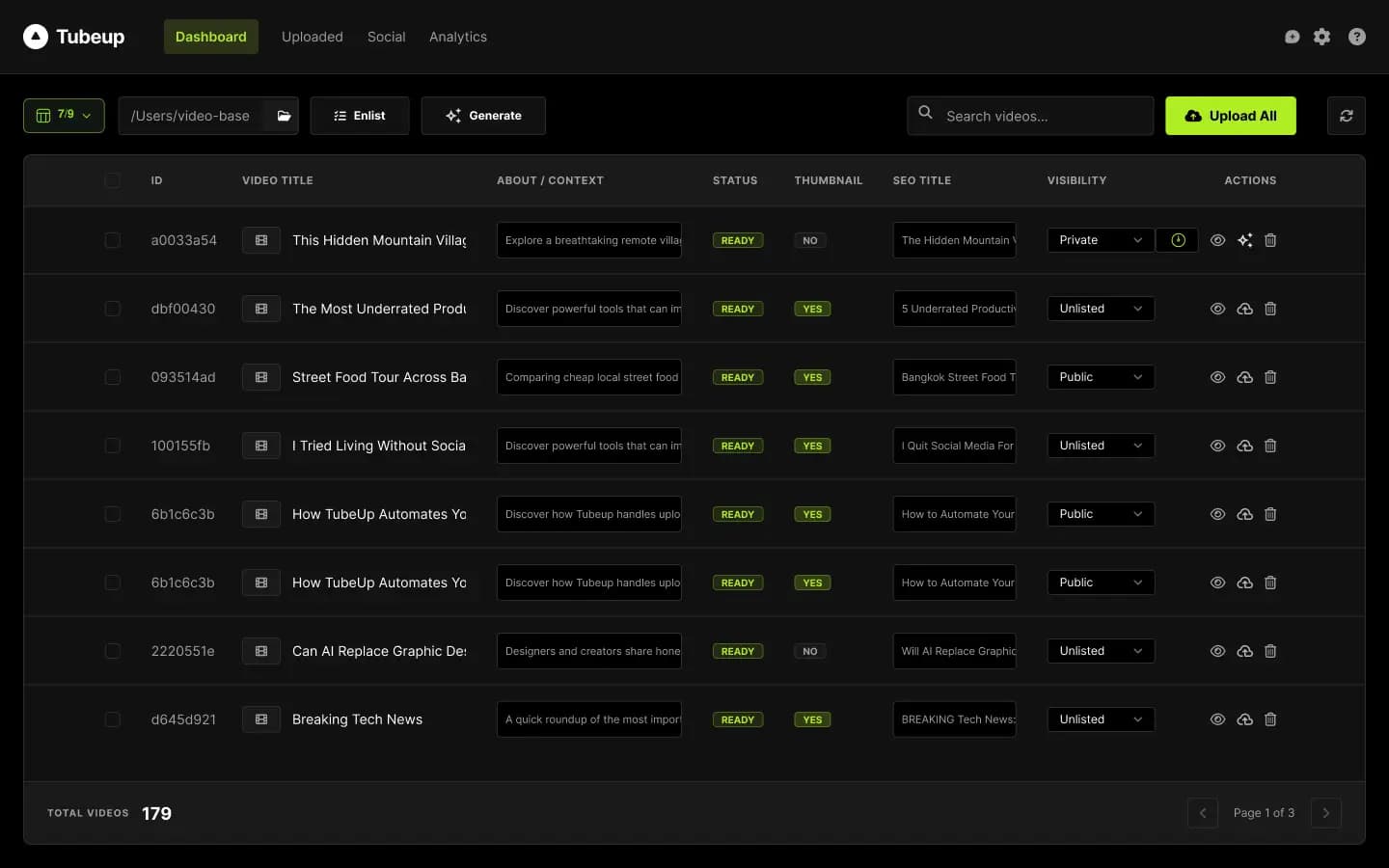
What's New in 2.0
From Upload Tool to Publishing Engine
Tubeup 1.0 was a very fast pair of hands: you enlisted files, generated metadata, and clicked upload. Tubeup 2.0 removes the sitting. Flows scan, write, upload, and promote on a schedule; a chat assistant does the work you'd otherwise click through; and a security, stability, and performance pass makes leaving it running a reasonable thing to do.
Tubeup 1.0 vs 2.0
The Same App,
a Different Job
Everything you set up in 1.0 still works — your descriptions publish byte-identical on day one. Here's what changed around them.
| Tubeup 1.0 | Tubeup 2.0 | |
|---|---|---|
| Publishing | You click upload | Flows upload on a schedule, while you're away |
| Control | Menus and forms | Menus, forms, or plain English in chat |
| AI providers | Gemini | 9 providers, including local models — the default has no per-word cost |
| Channels (API engine) | One — the second replaced the first | As many as you own, on one Google project |
| Descriptions | Global defaults, retyped per video | Named content profiles, applied in bulk |
| Channel per video | The default channel | Chosen on the video row |
| Backup | Settings | The whole install — videos, profiles, flows, chats |
| Closing the window | Everything stops | Automation can keep running in the tray (opt-in) |
| Startup | 1.44 s, 154 MB | 0.56 s, 53 MB |
| Double-publish risk | Three known paths | Closed |
Built For You
Who Is Tubeup For?
If uploading videos eats more of your day than making them, Tubeup was built for you — whether you run one channel or a client roster.
Solo Creators
“I spend more time uploading than creating.” Your upload session is now a folder you drop files into. A flow writes the metadata and publishes on the cadence you set — overnight, over a weekend, or while you're shooting the next batch.
Faceless & High-Volume Channels
Two hundred videos, five channels, one schedule. Flows with daily caps keep the pipeline moving, and the default AI provider has no per-word bill.
AI Content Creators
You generate content fast — now publish it just as fast, with metadata from the AI provider you already use, or a local model.
Content Agencies
Ten client channels, one Google project, one app. Pick the destination channel on each video row, and give each client its own content profile — a different sponsor set, link block, and hashtag list, switched by name.
Beginners
Not sure what automation will do? Press Simulate and watch the whole run before a single video moves — or just ask the chat.
Multi-Channel Managers
One channel list across both upload engines, a channel filter in Analytics, and per-channel credentials when a channel needs its own quota.
Existing Tubeup 1.0 Customers
Everything you set up still works. Your description defaults are migrated into a permanent Global Default content profile on first launch, so an upgraded install publishes byte-identical descriptions on day one — and your engine settings and flows migrate too. Nothing you wrote is lost or changed; there's just a lot more around it.
Core Features
Everything Tubeup 2.0 Does for Your Channel
Nine capabilities that turn a YouTube upload session into a publishing workflow you set up once — and control by clicking, typing, or not at all.
Automation Flows
Flows run Tubeup's own pipeline on a loop — watch a folder, write the metadata, upload, promote — with each step doing exactly what its button on the Dashboard does. Every flow gets its own schedule, a daily cap so it can't blow through your quota, an activity log, and a backlog view. Press Simulate to see the exact videos, metadata, and destinations before a single video moves. And when a flow pauses, it tells you why: quota exceeded, a channel no longer connected, or three failures in a row.
Simple Workflow
How Tubeup Works
Set it once and it publishes without you. Four steps from raw video files to a channel that keeps publishing on schedule — with a record of every video.
Drop Videos in a Folder
Point Tubeup at a watch folder. New files are enlisted in batches, thousands at a time if you need it.
Build a Flow
Choose the steps — metadata, content profile, upload, promote — a schedule, and a daily cap. Press Simulate to preview the run.
Let It Publish
The flow uploads on your cadence while Tubeup is open (or from the tray, if you turn that on). Or just ask the chat.
Check the Log & Share
Every run is in the activity log, every upload on the Uploaded page, and the social copy is ready to post.
Pricing
Pay Once.
Publish Forever.
Three lifetime licences for Tubeup 2.0 — priced by how many computers you install on, never by how many videos you upload. Every plan has every 2.0 feature, unlimited YouTube channels, and all future updates. Try it free for three days first; no card needed.
50% OFF every plan
Applied automatically at checkout — no code to type.
Solo
You save $24.50 with SUMMER50
For the individual creator running their own channels from a single computer.
Multiple
You save $49.50 with SUMMER50
For creators on a desktop plus a laptop, or a small team of two to three editors.
Team
You save $74.50 with SUMMER50
For agencies and publishing teams running client channels at volume.
Included in every plan
Plans differ only by how many computers you activate on — never by features.
3-day free trial
Full features, no card required
Free lifetime updates
Every future release included
No subscription
Pay once — never again
Refund policy
Covered by our standard terms


All prices in USD. Every licence is a one-time payment with no renewal, no per-video fees, and no per-channel fees. Need more than the Team plan covers, or a custom invoice? Talk to us.
Full Feature Set
The Details That Save You Time
Small, real refinements across every view — the kind of thing you notice on your hundredth upload, not your first.
Simulate Before It Runs
Preview a flow's exact videos, metadata, and destinations first.
Daily Cap per Flow
Automation can never blow through your upload quota.
Activity Log & Backlog
Every run on the record, and a view of what's queued next.
Keep Running in the Tray
Optional: close the window and let automation carry on. Off by default.
Schedule From the Row
Set a publish time where the video is — past times are refused.
The Uploaded Page
A read-only record of exactly what each video was uploaded with.
Searchable Settings
Type “quota” and jump straight to the highlighted row.
Videos per AI Request
Tune batch size to your AI provider's limits.
Channel Filter in Analytics
Switch between every connected channel on one page.
True Description Preview
See the About text that will actually publish, not an approximation.
Click to Copy Video IDs
One click puts any video's ID on your clipboard.
Auto Thumbnail Detection
Matching thumbnails are attached automatically during upload.
Playlists & Visibility
Per-video playlist and visibility, set by hand, in bulk, or by chat.
Audience & Age Settings
Audience declarations and age restrictions, global or per video.
Altered Content Declaration
Toggle YouTube's altered-content disclosure per video.
Denser, Cleaner UI
48px rows, unified typography, a column menu, and better accessibility.
Privacy & Security
Your Library Stays on Your Machine
Tubeup is a desktop app with a local database — there is no Tubeup cloud holding your content. Your library, your keys, and your sessions stay on your computer.
2.0 also locks down the local backend: every launch mints a secret that only Tubeup's own window is given, so web pages open in your browser can no longer reach it. A restored backup can't switch automation on, and the chat assistant can only propose changes you confirm.
Only outbound connections:
No Tubeup cloud. No third-party data sharing. No account to create. Signed macOS builds on every release.
Faster, Lighter, Safer
Built to Be
Left Running
Automation is only useful if you can trust it overnight. So 2.0 got faster at launch, lighter in memory, and closed the ways an upload tool can cost you a video.
2.6×
Faster backend start
1.44 s → 0.56 s
53 MB
Backend memory
down from 154 MB
~100 ms
List response
with 5,000 videos
3 ms
Per keystroke
with 5,000 videos
A video can't be published twice
Retry-after-success, a late cancel, and a crash mid-write could each re-publish a video in 1.0. All three paths are closed.
Large uploads survive dropped connections
API uploads resume from what the server actually holds instead of restarting a multi-gigabyte file.
Scheduling is all-or-nothing
If the date or time can't be set, the upload stops and says so — your 6am video never goes live at noon.
No phantom records
A video is never marked uploaded on a transfer that didn't finish, and cancelling a run no longer counts as a failure.
Measured on the packaged app. The Google API and browser-automation libraries now load the first time they're needed, not at every launch.
Our Story
Built for Creators,
by a Creator
Tubeup was born out of a real problem. Managing multiple YouTube channels means spending more time uploading than creating. The repetitive Studio grind — typing titles, writing descriptions, setting tags, choosing playlists, configuring visibility — for every single video, every single day.
Tubeup exists to eliminate that workflow entirely. Every feature was designed around one question: how do we give creators their time back?
Tubeup 1.0 answered that by making uploads fast. Tubeup 2.0 answers it by taking you out of the upload session altogether: drop files in a folder, let a flow publish on your schedule, and ask for changes in plain English when you need them. The parts of YouTube that slow you down run on their own — so your energy goes where it matters: making content.
Publish Without Sitting There
Flows upload on your schedule while you do the work that matters.
Metadata That Ranks
AI-written titles, descriptions, and tags — reviewed by you.
Scale Across Channels
Every channel you own, one Google project, one app.
Stay Private
A local database on your machine. No Tubeup cloud.
Stay in Control
Chat proposes, you confirm. Simulate before anything moves.
Pay Once
From $24.50 one-time. No subscription, no per-video or per-channel fees.
FAQ
Frequently Asked Questions
Get Started
Set It Once. It Publishes Without You.
Try Tubeup 2.0 free for 3 days — every feature, no card. Connect your channels, press Simulate on your first flow, and watch what your channel does while you're making the next video.
3-day free trial · From $24.50 one-time · 50% OFF with SUMMER50 · Instant download