Cliedesk: An AI Help Desk That Lives Inside WordPress
Meet Cliedesk, the AI help desk and live chat for WordPress and WooCommerce: an AI agent that answers and acts on orders, with refunds behind your approval.


Here is a support ticket every WooCommerce store has answered a hundred times. “My parcel arrived this morning, but the socks are missing. The jacket was there. Can you help?”
The answer takes about forty seconds once you have the facts in front of you. Finding the facts is the slow part. Someone opens the help desk, copies the order number, switches to wp-admin, finds the order, checks what shipped, checks the refund policy, switches back, writes the reply, switches again to issue the refund. The help desk could see the order the whole time. It just couldn't do anything with it.
That gap is why we built Cliedesk, and why it runs inside WordPress instead of next to it. It's a complete help desk and live chat plugin with a free version on WordPress.org, and a Pro add-on that brings in an AI agent able to resolve that ticket end to end — while a person still approves the money.
This post covers what Cliedesk is, what it deliberately won't do on its own, and who we think should try it.
The short version
Cliedesk is customer support software for WordPress and WooCommerce. The free plugin gives you a shared inbox with unlimited agents, a live chat widget, request forms, a help center built from ordinary WordPress posts, and a customer portal. Everything is stored in your own WordPress database.
Cliedesk Pro adds three layers of AI that share the same knowledge, policies and actions: an AI agent that talks to customers, a copilot that drafts replies for your team, and AI triage and quality scoring across every message. It also adds incoming email, WhatsApp, SMS and social channels, multi-step workflows and SLA policies. The AI runs on your own provider key or a local model. There are no per-seat fees and no per-resolution AI fees.
Why the help desk belongs inside the site
Hosted help desks were designed for companies whose customers don't have an account anywhere the help desk can reach. A WordPress business is different. Your customers already have a login on your site. Their orders, subscriptions, memberships and downloads already live in your database.
Putting the help desk in the same place changes a lot of small things at once:
- Customers are recognised automatically. Nobody has to ask which email the order was placed under.
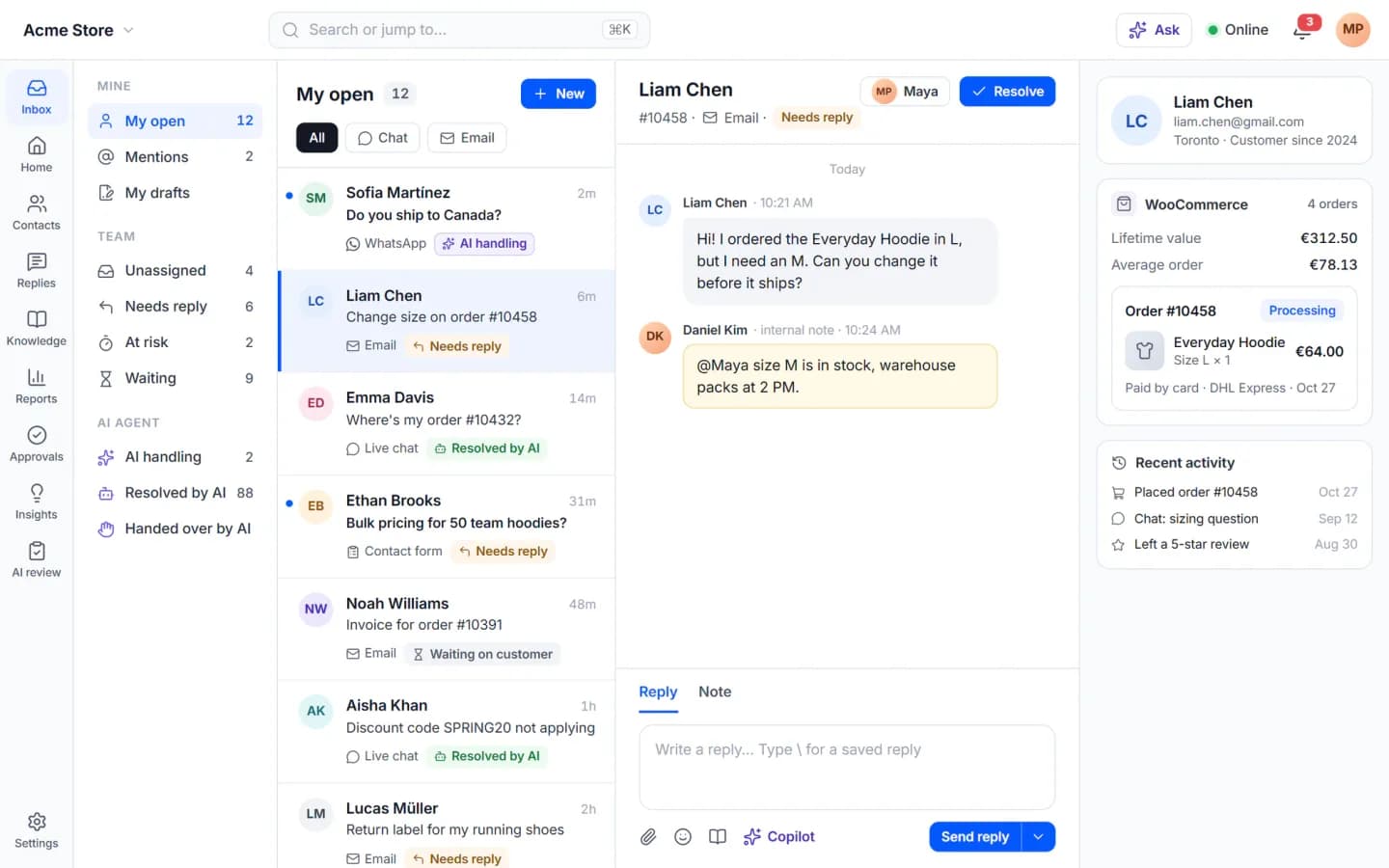
- WooCommerce orders are read live. Orders, lifetime value, tracking and products appear beside the conversation with no sync job and no API keys, with HPOS on or off.
- The help center ranks on your domain. Articles are normal posts written in the block editor, published in your theme, with Yoast, Rank Math, SEOPress or AIOSEO handling the SEO.
- There's nothing to count per agent. Every plan, including the free one, has unlimited agents.
It also means the data is yours in a very literal sense. Cliedesk sends nothing to a Cliedesk service — no cloud copy, no relay. You can export everything as a ZIP, with or without a licence.
The free plugin is a real help desk
We were careful about where to draw the line between Free and Pro, because a “free” help desk that stops working at the third agent isn't free. So the free plugin is complete without any AI at all.
Your team works in a full-screen app at /desk, with views like My open, Unassigned and Needs attention. There are internal notes, mentions, collision detection so two people don't answer the same customer, saved replies you can pull up with a backslash, undo send and send later. Merge, split, snooze and bulk actions can all be undone. We benchmarked the inbox with a million conversations: the list loads in under five milliseconds of server time.
The chat widget is about 35 KB gzipped and loads only after your page is idle, so it doesn't drag down Core Web Vitals. It knows who's signed in and what's in their cart, accepts files and voice notes, tells visitors your next opening time when you're offline, and uses no cookies.
The customer portal appears at /support/ the moment you activate the plugin. On a WooCommerce store it also shows up under My Account → Support, and every order gets a “Get help” button. Guests sign in with a six-digit code sent by email.
Add one-step rules, routing to teams and queues, business hours and holidays, CSAT surveys and the core reports, and you have what most small teams actually pay a hosted tool for.
What the AI agent does — and what it won't do alone
Most support chatbots answer questions. Customers mostly want things done: an address changed before the parcel ships, a missing item refunded, a subscription paused. That's action, and action is exactly where an AI that guesses becomes expensive.
So the Cliedesk agent is built the other way round from a typical chatbot.
It only says what it can back up. The agent answers from your help center and from the customer's own orders, and checks every claim against those sources before sending. If an answer is weak, it doesn't send it. It asks one clarifying question or hands the conversation to a person, with a summary so nobody has to read the thread from the top.
Every action has its own switch. Each thing the agent can do — refund, cancel, change an address, issue a coupon, reship — has an autonomy level: Off, Suggest, Ask approval or Auto. New actions start switched off.
Money waits for a human. Refunds, credits, coupons and reships need approval for every amount by default. You can set auto-approve limits, but only after the agent has run in shadow mode. And the customer confirms cancellations, address changes and refunds themselves.
Guardrails are checked in code, not in a prompt. Money limits per role, order windows, frequency limits and a monthly budget are enforced by the plugin. A clever message from a customer can't talk its way past them.
Back to the missing socks. The agent finds order #10449, sees it was delivered, sees the socks were a separate line, reads your missing-item policy, and offers the customer a refund or a new pack. The customer picks the refund. The agent prepares €18.00 back to PayPal — taken from the order line, not from the customer's message — and the conversation waits in your inbox with an Approve button. One click, and it's done.
The agent starts in shadow mode: it drafts replies on real conversations as private notes that only your team can see. When the drafts are consistently right, you switch channels to live one by one — or only after hours.
A copilot for the people who stay in the loop
Not every conversation should be handed to an agent, and not every team wants one. The copilot is for them. It drafts replies grounded in the conversation, the order and your knowledge, offers one-click rewrites, answers questions in an Ask box with numbered sources, writes rolling summaries and handoff notes, and translates — clearly marked “Translated by AI”. It never sends anything by itself.
There are no copilot seats and no monthly cap per agent. If ten people use it all day, it costs what ten people's worth of AI requests cost at your provider. Nothing more.
Bring your own AI — and keep the bill predictable
Cliedesk doesn't sell AI credits. You connect the provider you already use — OpenAI, Anthropic Claude, Google Gemini, Mistral, OpenRouter, Azure OpenAI, AWS Bedrock or Google Vertex AI — or run Ollama, LM Studio or vLLM on your own server and pay nothing per token.
Because it's your bill, the controls are yours too. Pick a model per task. Set a monthly budget; you get alerts at 50, 80 and 100 percent, and at the hard cap the AI degrades gracefully instead of dropping conversations. Every AI answer has a trace showing the sources, policies, tokens, cost and time behind it. Personal details are masked before every cloud AI call, and a strict mode limits the AI to local models only.
If you've followed our work on Revoye, you'll recognise the principle: your AI, your keys, no middleman marking up the tokens.
How it compares to Zendesk, Intercom and Help Scout
We won't pretend hosted help desks are bad products. Zendesk, Intercom and Help Scout are mature and very good at what they do. The difference is the shape of the bill and where the data lives.
Hosted tools charge per agent, and their AI is usually billed per resolution on top. As of late October 2026, Zendesk's popular plan lists at $55 per agent per month billed annually, and Intercom's Fin AI agent charges $0.99 per outcome. Three agents on that Zendesk plan come to roughly $1,980 a year before any AI. Cliedesk Pro for one site with unlimited agents is $49 a year, and AI costs whatever your provider charges.
The honest trade-off: Cliedesk lives in WordPress, so it's the right fit when your business already does. If your customers don't have accounts on a WordPress site, a hosted tool is probably the better call. There are detailed, regularly checked comparisons on cliedesk.com if you want the line-by-line version.
Who should try it
- WooCommerce stores drowning in where is my order messages.
- Plugin, theme and SaaS vendors who need licence resets, download links and per-product setup.
- Membership and course sites on MemberPress, LearnDash or LifterLMS, where knowing the member matters more than the ticket.
- Agencies that want one help desk pattern across client sites, with white label and agency mode in Pro.
We also run our own support on it. support.degird.com is a Cliedesk install, which has been the fastest way to find out what's annoying about a help desk.
Pricing in one paragraph
The free plugin is free forever. Cliedesk Pro is one plan priced only by the number of sites, and every licence includes every Pro feature. Yearly, it's $49 for one site, $99 for ten, $149 for a hundred and $299 for unlimited. Lifetime licences start at $99 for one site, and monthly plans start at $29. Local and staging sites don't count. If a licence lapses, Pro keeps working — AI included — and only updates and support stop.
Getting started
Install Cliedesk from WordPress.org, or try it in your browser first with the live demo on WordPress Playground. The free help desk is ready the moment you activate it. When you want the AI, add Cliedesk Pro, point the agent at your knowledge, and let it prove itself in shadow mode before it speaks to anyone.
And if you're running client work rather than a store, have a look at Cliezoo, our AI client portal and CRM for WordPress, which launched alongside it. You'll find both on our WordPress plugins page.

Written by
Arif HossainWordPress & Plugin Engineer
WordPress & plugin engineer at Degird, building the plugins that harden and extend WordPress — Cliedesk, AuthDock, GuestDock, and SyncDock.
Keep Reading
 Product Updates
Cliezoo: A Client Portal and CRM Inside WordPress
Cliezoo runs your client business in WordPress: CRM, proposals with e-signature, projects, a branded portal, invoicing and AI agents. Free, no per-user fees.
Read Article Product Updates
SyncDock Client 1.2: WordPress Publishing on Autopilot
SyncDock Client 1.2.1 runs automations on your own WordPress server, bulk-edits 50 posts across 10 sites, and finds the posts losing search traffic.
Read Article Product Updates
What's New in Tubeup 2.0?
Tubeup 2.0 turns a YouTube uploader into a publishing engine: automation flows, chat, nine AI providers, every channel on one Google project, and a faster, safer app.
Read Article