Cliezoo: A Client Portal and CRM Inside WordPress
Cliezoo runs your client business in WordPress: CRM, proposals with e-signature, projects, a branded portal, invoicing and AI agents. Free, no per-user fees.


Count the tools a small agency pays for just to look after its clients. A CRM for leads. Something to build proposals. An e-signature service, because the proposal tool's signing costs extra. A scheduler. A project app. A client portal, so clients stop emailing files. An invoicing tool, and a time tracker to feed it.
That's eight logins, most of them priced per seat, and the same client's name, address and billing details typed into at least half of them. When someone joins the team, the bill goes up eight times. When a client asks where their files are, the honest answer is “in one of several places.”
We've lived with that stack at Degird, and we've watched the agencies and freelancers we work with live with it too. Cliezoo is what we built instead: one workspace, inside the WordPress site you already own, that takes a client from first enquiry to final payment without retyping anything.
What Cliezoo is
Cliezoo is a WordPress plugin for service businesses — agencies, freelancers, web designers and developers, consultants and coaches. It covers the CRM, proposals and contracts with e-signature, projects and tasks, files and approvals, a branded client portal, time tracking, invoicing and payments, forms and booking, and AI agents that do the busywork. Fourteen modules, one login, one client record.
The free plugin has no caps on clients, portals, projects, members or invoices, and there's no trial because there's nothing to trial — it's free forever. Cliezoo Pro is an add-on that puts the workspace on autopilot with an AI assistant, visual automations, profitability reporting and recurring revenue.
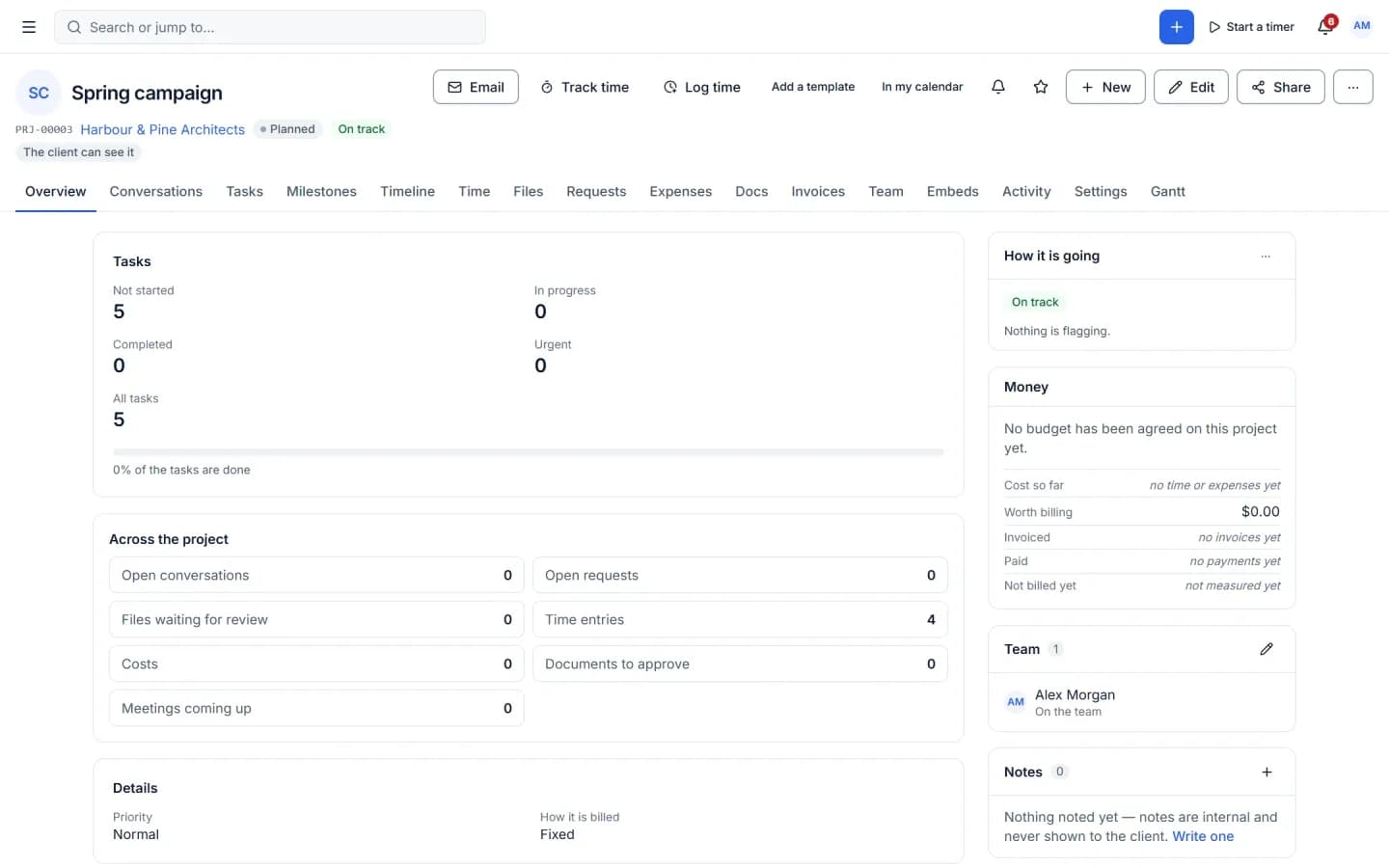
One record, from lead to payment
The best way to explain Cliezoo is to follow a single client through it.
The lead. Someone fills in a form or books a call from a booking page on your site. The form has built-in anti-spam — a honeypot and timing checks, no captcha — and can be embedded with a block, a shortcode or a QR code. A lead appears in your pipeline. One click turns it into a client, a contact and a deal.
The proposal. You build it in a page builder, pulling services from your catalogue with your tax and discount rules already applied. You can see when the client opens it. They sign it in the browser, and Cliezoo records the timestamp, IP address, device and SHA-256 hashes, then produces an audit certificate and a tamper-evident final document. If you ask for a deposit, they pay it in the same step. There's no separate DocuSign subscription involved.
The project. The signed proposal becomes a project from one of your templates — milestones, recurring tasks, the lot. Your team works on boards, tables, calendars or lists. Every project has a budget panel showing what's billable, invoiced, collected, unbilled and remaining, so “are we making money on this?” has an answer before the project ends.
The delivery. Clients follow along in their portal. They leave feedback by dropping pins directly on images, PDF pages or a video timecode, and approve deliverables with a click. No more “see my notes in the third email.”
The invoice. Tracked time and finished milestones flow into an invoice, and time entries lock once they're billed. Clients pay through Stripe — including Apple Pay and Google Pay — PayPal or Razorpay, or by bank transfer, Wise or any manual method you add. Reminders go out on a schedule and stop the moment the invoice is paid.
That's the whole point. Nothing in that journey is entered twice.
A client portal that's actually yours
Client portals are usually the most visibly rented part of the stack. They live on someone else's subdomain, carry someone else's logo, and charge per client.
Cliezoo's portal runs on your own domain, with unlimited portals and no per-client fees. Clients sign in with a magic link, two-factor authentication or a passkey. A login designer lets you match your brand, and there's no Cliezoo branding — the small “Powered by Cliezoo” credit is off by default. You decide, per client, which modules they can see or edit, and client roles cover Admin, Member and Viewer for larger accounts.
The portal and the workspace run as a full-screen app isolated from your theme, so they work the same on any WordPress site, whatever theme it uses.
AI that drafts, so people can decide
We spent a long time on how AI should behave in software that touches clients and money. The rule we settled on is simple: agents do the busywork, people make the calls.
In the free plugin, AI writing is available in every editor — write, rewrite, shorten, expand, fix grammar, change tone, translate — along with summaries and reply drafts for threads, documents and form answers. There's also an MCP server that lets Claude, ChatGPT, Cursor and other agents work with your workspace through 150 curated tools, grouped into read, safe and sensitive. Writes from outside agents are drafts first, sensitive tools are off by default, agents get their own dedicated user, and one kill switch stops them all.
Cliezoo Pro adds the AI Hub: an assistant panel you open with Ctrl/Cmd+J to ask questions about your whole workspace and run confirmed multi-step jobs; quick create (type “Invoice Bluedot $500 for the logo refresh” and review the draft); a daily briefing; predictions for lead scores, win probability, churn risk and late payments; and whole proposals or contracts drafted from a short brief.
In Pro you choose, per kind of action, whether the AI suggests, drafts or runs. And regardless of that setting, anything that deletes, sends or touches money always waits for a person. AI can be switched off per module or per role, and every AI action is labelled, logged and undoable.
Cliezoo doesn't sell AI credits. In the free plugin, AI runs through WordPress AI Connectors (the key stays in WordPress) or Revoye, our own AI service. Pro adds bring-your-own keys for Claude, Gemini, OpenAI, DeepSeek, Qwen, Perplexity, OpenRouter, any OpenAI-compatible gateway, and local models via Ollama or LM Studio.
Your client data stays on your server
SaaS client tools rent you access to your own client data. If you stop paying, or the company changes its pricing, your client history goes with it.
Cliezoo stores everything in your WordPress database and private file storage. Neither Cliezoo nor Degird receives your client data, and there's no telemetry unless you opt in. You can export everything as JSON at any time, and the WordPress personal-data exporter and eraser work as you'd expect. Accounts are protected with TOTP two-factor and recovery codes, passkeys, a session list, and 2FA that you can require per role. Public file links can have a passcode, an expiry date and a revoke button. There's an audit log and a 30-day trash.
If you want to harden the WordPress login itself, AuthDock pairs well with it, and our WordPress login security guide walks through the basics.
Free versus Pro
The free plugin is genuinely complete for running client work. It includes unlimited clients, portals, projects and members; the CRM with unlimited pipelines; proposals, contracts and e-signature with an audit certificate; projects, boards, milestones and recurring tasks; Drive-style files with pinned feedback and approvals; invoices with Stripe, PayPal, Razorpay and bank transfer; time tracking, expenses and reminders; forms, questionnaires and booking pages; the AI writing helpers and MCP server; and 2FA, passkeys, the audit log and full data export.
Pro adds the AI Hub, the visual automation builder with AI steps, profitability and forecasting reports, recurring invoices, retainers and payment plans, Google Drive, S3 and R2 storage, webhooks, Zapier and accounting sync with tools like QuickBooks and Xero, custom roles and teams, and the invoice layout designer.
Pro is licensed per WordPress site, and every licence includes every Pro feature — licences differ only by the number of sites. If a licence ends, Pro keeps working at the version you have; only updates and support stop. In neither Free nor Pro does Cliezoo take a cut of your client payments. Current prices are on cliezoo.com/pricing.
Moving from another tool
If you're on SuiteDash, HoneyBook, Dubsado, Bonsai, Plutio or similar, switching is a four-step job: install the free plugin, export from your current tool, import into Cliezoo with field mapping and a duplicate check, and invite your clients to their new portal. Cliezoo also has a comparison section that sets out, tool by tool, how the pricing models differ.
Getting started
Cliezoo needs WordPress 7.0 or newer and PHP 8.1 or newer. After you install it, a setup wizard takes about a minute — business details, an email test, payment methods and your workspace URL — and offers twenty industry presets so you don't start from a blank screen. You can load sample data to look around before your first real client.
Get Cliezoo free, and if you also handle customer support for a store or product, take a look at Cliedesk, the AI help desk we launched alongside it. Both are on our WordPress plugins page.

Written by
RakibuzzamanFounder & CEO
Founder and CEO of Degird. Building focused, privacy-first software products and running an AI-powered agency for teams that want the same standard for their own work.
Keep Reading
 Product Updates
Cliedesk: An AI Help Desk That Lives Inside WordPress
Meet Cliedesk, the AI help desk and live chat for WordPress and WooCommerce: an AI agent that answers and acts on orders, with refunds behind your approval.
Read Article Product Updates
SyncDock Client 1.2: WordPress Publishing on Autopilot
SyncDock Client 1.2.1 runs automations on your own WordPress server, bulk-edits 50 posts across 10 sites, and finds the posts losing search traffic.
Read Article Product Updates
What's New in Tubeup 2.0?
Tubeup 2.0 turns a YouTube uploader into a publishing engine: automation flows, chat, nine AI providers, every channel on one Google project, and a faster, safer app.
Read Article